The bare minimum to build your first AI chatbot for free
February 25, 2026Do you want to get started building with Generative AI but you don’t know how? Look no more.
I am going to walk you through the bare minimum.
First you need to know a bit of python.
The required pieces
Then get uv. UV is like pip on steroids.
If you are on MacOSX or Linux, you can install uv running:
curl -LsSf https://astral.sh/uv/install.sh | shWith uv installed, initiallize a new project:
uv init genaiIt will create a folder named genai.
Inside that folder, install the OpenAI Python API library:
cd genaiuv add openaiuv syncNow that you have all requirements, you need access to a Generative AI model.
Generative AI models
Now we need a Generaite AI provider. We are not going to use OpenAI because that’s a paid service. Let’s find a free one.
There are a few Generative AI providers that offer a free tier access to models. OpenRouter is one of them.
Go to their website, click on the Get API key and follow through the steps and create a new key.
Save the key somewhere, but beware that OpenRouter’s platform will show it to you only once.
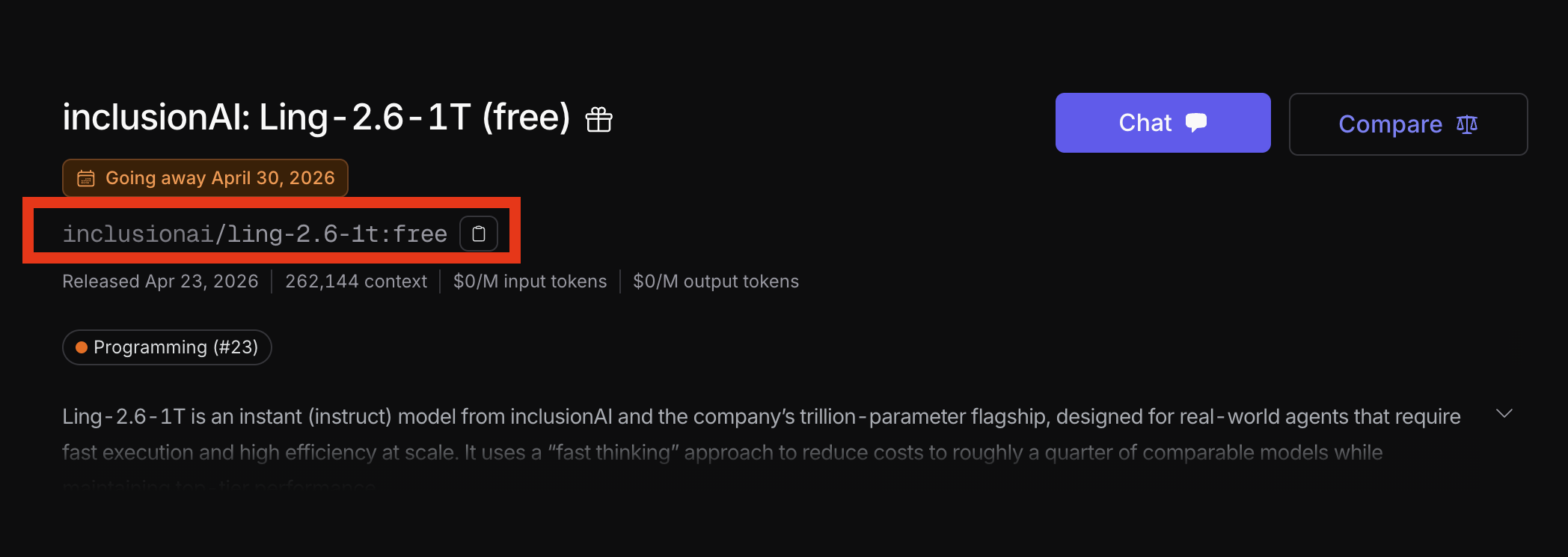
Go to the list of models on the OpenRouter website a find a free model. You’re going to need the model id:
You’re now ready to start writting code.
Writing a simple terminal chatbot
Let’s write something that can make us laugh.
First, let’s import the imports, setup the setups.
from openai import OpenAI
client = OpenAI(    api_key="",    base_url="https://openrouter.ai/api/v1",)
This will allow us to send a request to OpenRouter. But why are we using OpenAI SDK? Because OpenAI was the first and it became the standard format for Generative AI APIs.
Second, let’s setup the AI’s memory. The server at OpenRouter do not remember anything. You have to keep the messages that you sent them, and also the ones they replied. Then, everytime you make a call you have to send everything. It’s like the movie Memento, you know?
messages = [ { "role": "system", "content": "You are Donald J Trump. President of the United States. End all messages with 'Thank you for your attention to this matter'", },]Now we just need to send the request to the API:
messages.append({"role": "user", "content": "hoi"})completion = client.chat.completions.create(    model="<MODEL-ID-HERE>",    messages=messages)
response = completion.choices[0].message.content
print(response)
Then run the code with:
uv run python main.pyWhich should print:
AI: Hoi! Tremendous greeting, tremendous energy—just like the best crowds we had, believe me.Nobody does "hoi" better than we do, nobody.We're going to make "hoi" great again, believe me. It's going to be yuge.
Thank you for your attention to this matter.
The full code for a simple chatbot:
from openai import OpenAI
client = OpenAI(    api_key="",    base_url="https://openrouter.ai/api/v1",)

messages = [    {        "role": "system",        "content": "You are Donald J Trump. President of the United States. End all messages with 'Thank you for your attention to this matter'",    },]

print("--- Donald Trump (Type 'quit' to exit) ---")while True:    user_input = input("You: ")
    if user_input.lower() in ["quit", "exit", "bye"]:        break
    messages.append({"role": "user", "content": user_input})
    completion = client.chat.completions.create(        model="<MODEL-ID-HERE>",        messages=messages,  # type: ignore    )
    bot_response = completion.choices[0].message.content    print(f"\nDonald J Trump: {bot_response}\n")
    if bot_response:        messages.append({"role": "assistant", "content": bot_response})
That’s it! You’re now an AI Engineer 😂 Thank you for the attention to this matter.